
For development teams embedding enterprise Web pages in the QwenWork desktop client.
For development teams embedding enterprise Web pages in the QwenWork desktop client. The architecture diagram explains the two hosting modes; the rest of this guide documents the JSAPI.
Document version 1.30.0 · Updated 2026-09-20 ·
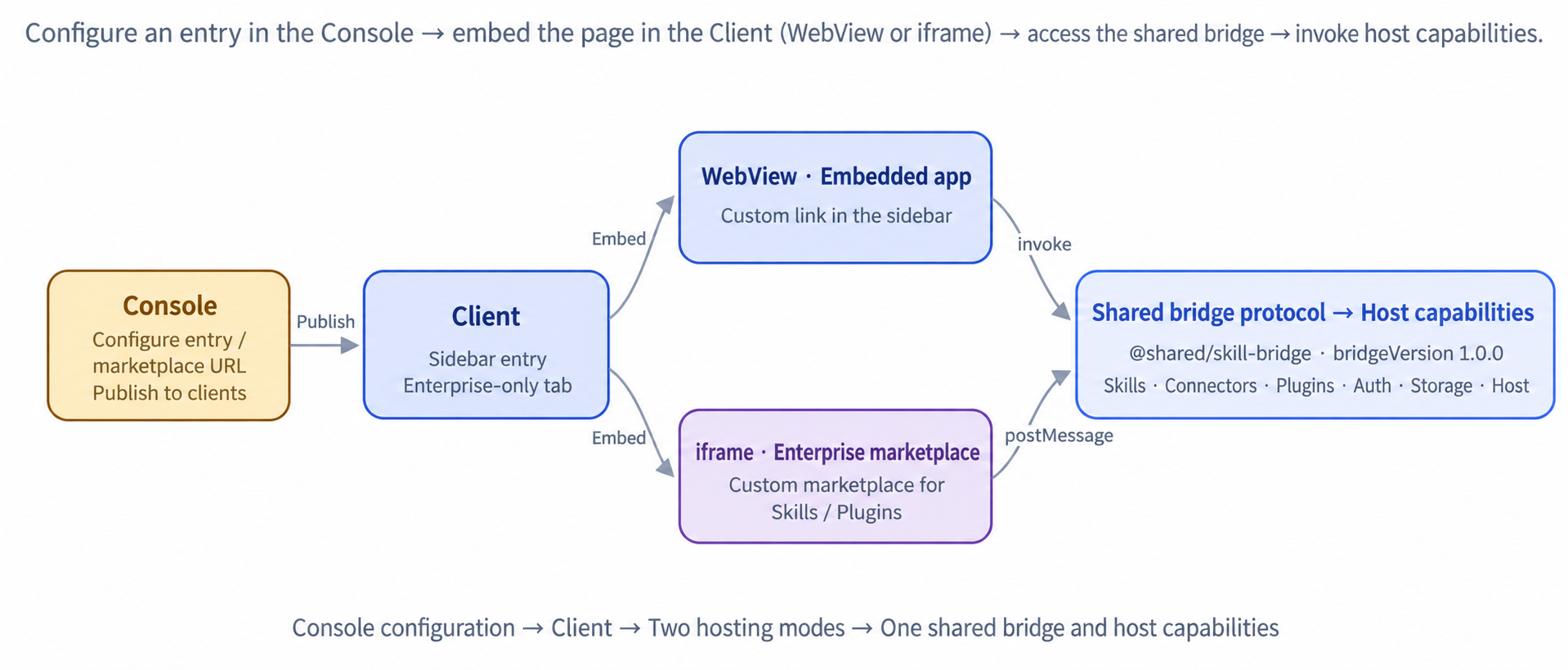
The client provides two modes for embedding enterprise pages. Both expose the same JSAPI (method names, parameters, and events; bridgeVersion: 1.0.0), but differ in where they appear, what they host, and how they are hosted:
 Embedded app (WebView) · Sidebar entry
 iframe · Enterprise-only marketplace for Skills / Plugins
Methods are grouped by domain, with invocation examples and return values. WebView uses window.qwBridge; iframe uses a page-defined callBridge. Method names and parameters are identical.
Both hosting modes use identical method names and parameters. In WebView, the host directly injects window.qwBridge. In iframe, the host does not inject any scripts; the page implements callBridge using postMessage (a complete implementation is provided below).
WebView · Host-injected window.qwBridge
app.* retrieves the embedded app's information and host bridge capabilities; auth.* retrieves login state and credentials for the enterprise backend. Each method's purpose and return values are described below.
app.getInfo · Get basic information about the current embedded app
Returns the app ID, display name, route identifier, and current published version configured in the console, allowing the page to identify its app and version.
1 · Architecture and integration
1.1 Two hosting modes
The client provides two modes for embedding enterprise pages. Both expose the same JSAPI (method names, parameters, and events; bridgeVersion: 1.0.0), but differ in where they appear, what they host, and how they are hosted:
| Mode | Location | Content | Hosting behavior |
|---|---|---|---|
| Embedded app (WebView) | Sidebar entry (select “Open in QwenWork” for a custom link in the console) | Enterprise business pages, such as knowledge bases, office automation, and tickets | The preload script injects window.qwBridge; the view stays mounted and is only hidden when switching away |
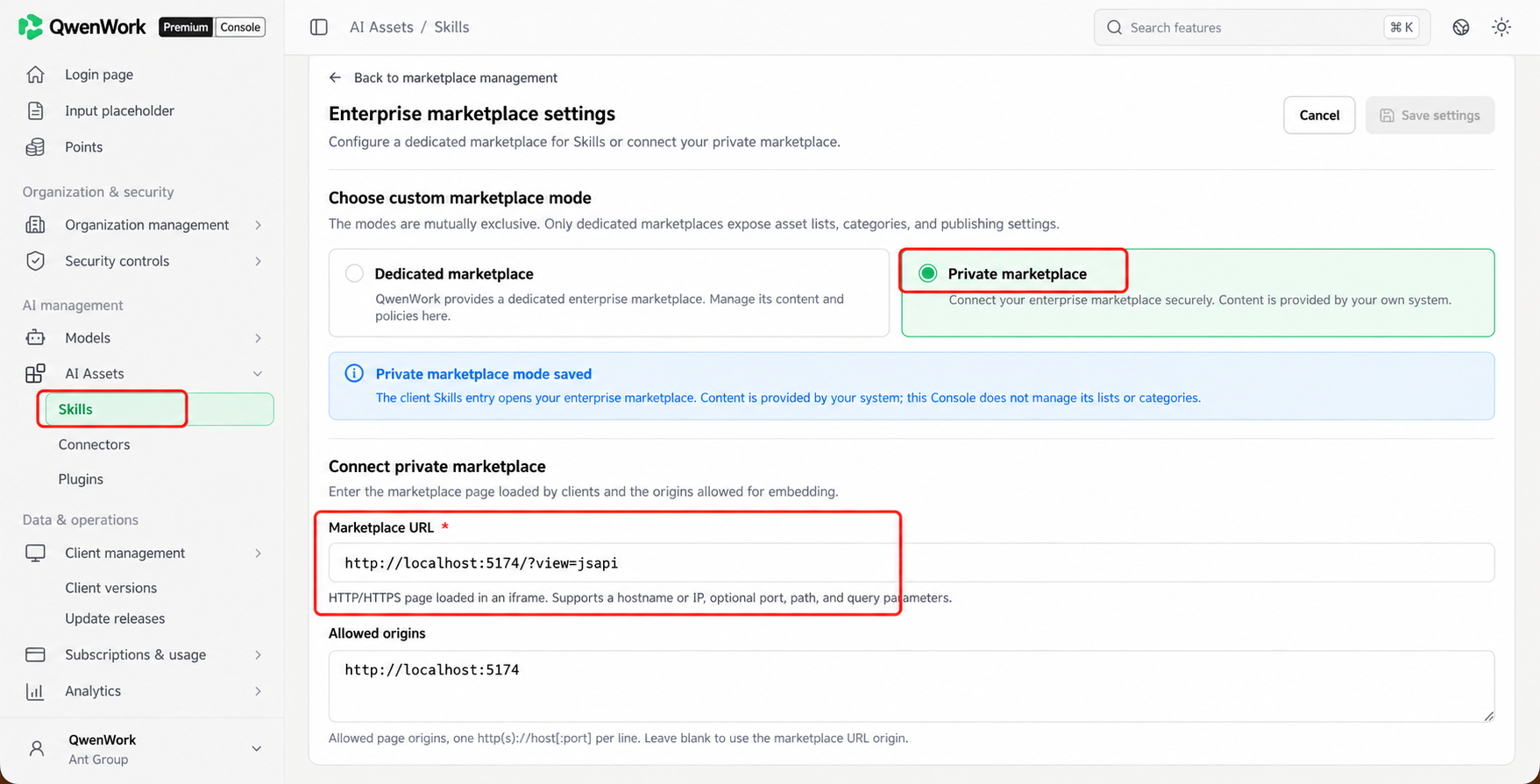
| iframe (enterprise marketplace) | Enterprise-only marketplace pages for Skills, Plugins, and Connectors | The enterprise's private marketplace or directory of skills, plugins, and connectors | postMessage plus a page-defined callBridge; mounted only when the tab is active and unmounted when switching away |
1.2 Console configuration
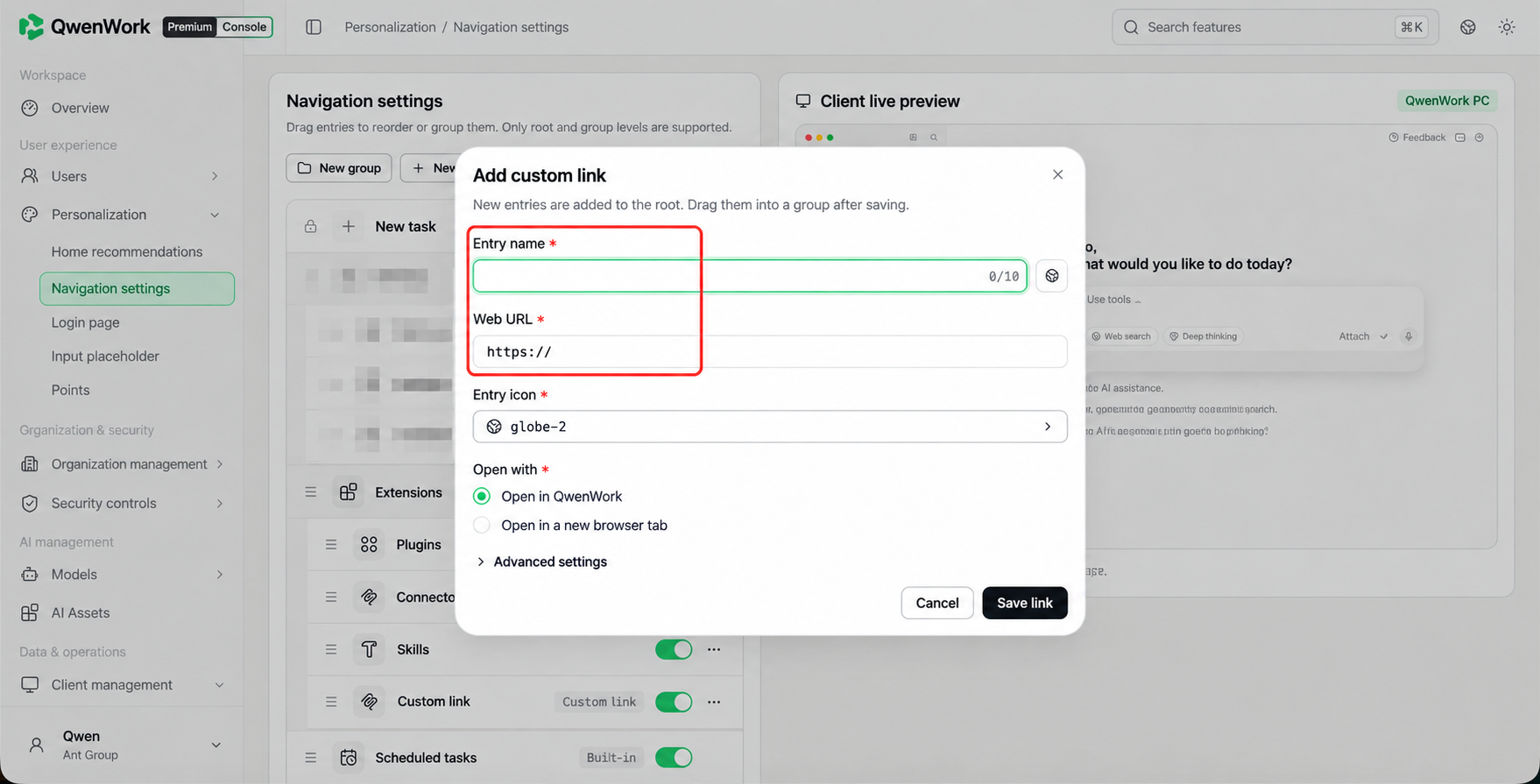
- Go to Personalization → Navigation settings → Custom link, and select “Open in QwenWork” to enable the bridge.
- Optional advanced settings: route identifier route (for deep links), an offline ZIP package, and environment variables envVars.
- After saving the entry, Publish it on the Navigation settings page to deliver it to clients.
2 · JSAPI
Methods are grouped by domain, with invocation examples and return values. WebView uses window.qwBridge; iframe uses a page-defined callBridge. Method names and parameters are identical.
2.1 Two invocation methods
Both hosting modes use identical method names and parameters. In WebView, the host directly injects window.qwBridge. In iframe, the host does not inject any scripts; the page implements callBridge using postMessage (a complete implementation is provided below).
WebView · Host-injected window.qwBridge
iframe · Complete postMessage wrapper (ready to copy)
- Calls are available on initial render without a handshake. Use invokeSafe for a structured error envelope.
- Host events have the same names in both modes: skills:changed / connectors:changed / expertKits:changed / connector.statusChanged / connector.toolsChanged / page.themeChanged / page.languageChanged. Asynchronous tasks also emit <method>:progress / :complete, including requestId.
- The WebView host does not set a timeout; pages may implement one. The iframe default is 10 seconds.
2.2 app.* / auth.* (Apps and login state)
app.* retrieves the embedded app's information and host bridge capabilities; auth.* retrieves login state and credentials for the enterprise backend. Each method's purpose and return values are described below.
app.getInfo · Get basic information about the current embedded app
Returns the app ID, display name, route identifier, and current published version configured in the console, allowing the page to identify its app and version.
app.ping · Check bridge connectivity
A lightweight liveness check that returns immediately, allowing the page to check bridge availability during initialization.
app.getEnv · Read environment variables delivered by the console
Reads environment variables configured for this app's custom link, such as a tenant ID (see the advanced settings in 1.2). Returns an empty object when none are configured.
app.getCapabilities · List bridge capabilities
Returns the bridge version, callable methods, subscribable events, and error protocol for capability detection and fallback handling.
auth.getLoginState · Get login state and current user information
Checks whether the user is logged in and retrieves basic user information. When logged out, user is null; the page can guide the user to log in.
auth.getToken · Get a token for the enterprise backend
Returns a Bearer token and its expiration information. Send it in the Authorization header when calling your enterprise backend. Retrieve a new token when expiresIn elapses; do not cache it long-term.
auth.logout · Log out of the current account
Asks the host to start the logout flow. The method returns first; the host then logs out.
user.id is a unique identifier across systems. Do not cache login state or tokens long-term. Never write tokens to logs, URLs, or localStorage.
2.3 host.* / agentRuntime.* (Environment and device)
getEnvironment is a lightweight check; if the call fails, treat the page as running in an ordinary browser. getClientInfo uses empty strings for device fields that cannot be collected and caches results for 60 seconds. Path checks accept only absolute paths; relative paths and ~ return INVALID_PARAMS.
2.4 page.* (Pages and navigation)
Pass either skillName or pluginName to toIndex, using the local directory name. An uninstalled item returns SKILL_NOT_FOUND or EXPERT_KIT_NOT_FOUND. Calling close without name closes the current view.
2.5 skill.* (Skills)
Both skillId and name are local directory names. upload.start / aoneKitInstall / update / installFromZip are asynchronous tasks (:progress / :complete). accessPolicy only reads policy and does not enforce it; the page controls button visibility.
2.6 connector.* (Connectors / MCP)
The list returns displayName and description as multilingual objects. Index them using page.getLanguage and implement fallback in the page. Use setEnabled for both enabling and disabling. Built-in connectors (source:"builtin") are read-only; configuration and authorization use the host dialog opened by connector.open.
2.7 expertKit.* / storage.* / enterprise.* (Plugins / Storage / Enterprise credentials)
2.8 Flat compatibility methods (WebView only)
These flat compatibility names are available only in WebView, not iframe. Use page.openUrl for external links. For addToChat, the host downloads a file as an attachment; a folder with mcp becomes a remote-reference chip passed to the specified MCP tool.