
Provide the information needed for effective support and feedback.
If you encounter a feature issue while using QwenWork, open Feedback in the top-right corner and submit a report manually or through AI customer support. You can also email contact@qwenwork.ai. Complete information helps developers identify and resolve issues more quickly.
Provide as much of the following information as possible:
Open the affected conversation, then view and copy the following information from the side bar. 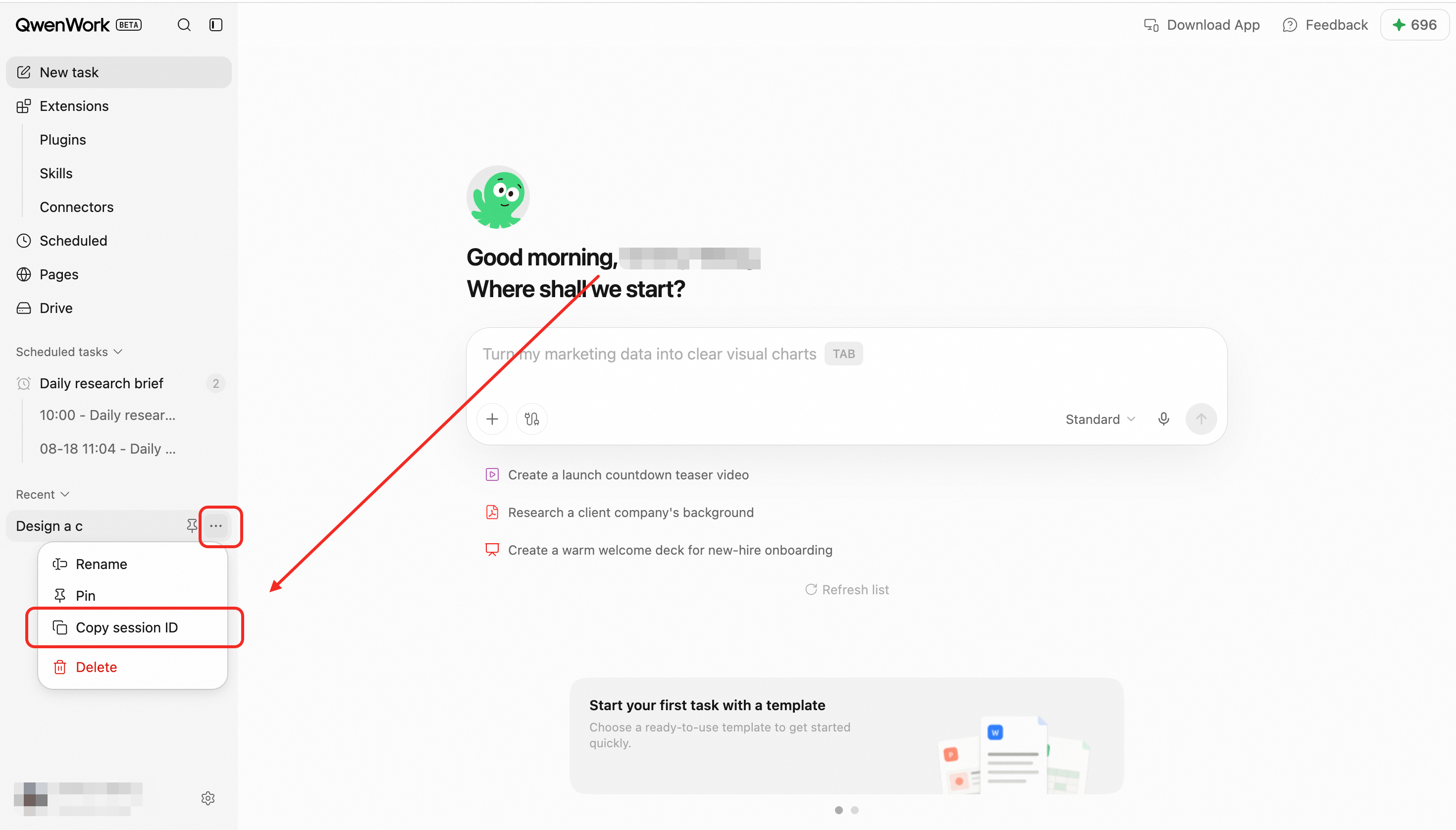 If you cannot find this information, provide the time of occurrence and a screenshot of the affected conversation so support staff can assist with the lookup.
Session IDs are used only to identify the relevant account, conversation, and execution records. Do not include passwords, verification codes, access tokens, or other sensitive information in your feedback.
If you cannot find this information, provide the time of occurrence and a screenshot of the affected conversation so support staff can assist with the lookup.
Session IDs are used only to identify the relevant account, conversation, and execution records. Do not include passwords, verification codes, access tokens, or other sensitive information in your feedback.
Possible Issues
- Messages cannot be sent or nothing happens after clicking Send.
- A message remains in progress for an unusually long time.
- A response stops midway, omits content, or repeats itself.
- A response is unrelated to the question or misunderstands the context.
- QwenWork forgets earlier messages or references incorrect content during a multi-turn conversation.
- The page reports that a task failed or the request timed out.
- The same task runs more than once.
- A task is marked successful, but no result is generated.
- A file cannot be uploaded, parsed, previewed, or downloaded.
- File content is recognized incompletely or its formatting is corrupted.
- Generated documents, spreadsheets, or other files cannot be opened.
- An Expert Kit or skill cannot be installed, enabled, or used.
- A connector cannot be authorized, reports insufficient permissions, or fails to retrieve data.
- Conversation history is missing, cannot be opened, or displays incorrectly.
- The page is blank, buttons do not respond, or the application frequently freezes.
- Sign-in fails, a feature is unavailable, or a permission error appears.
- Content or task statuses differ between mobile and desktop devices.
- Any other issue that prevents normal use.
Information to Include
Provide as much of the following information as possible:
- Issue description: What actually happened.
- Expected result: What should normally have happened.
- Time of occurrence: The exact date and time of the issue.
- Steps to reproduce: What you did before the issue occurred.
- Images or videos: Screenshots or recordings showing the issue.
- User ID: Identifies the affected account.
- Session ID: Identifies the specific affected conversation.
Finding Your Session ID
Open the affected conversation, then view and copy the following information from the side bar.