
This page sets the message members see after using up their personal credit allowance for the current period.
This page sets the message members see after using up their personal credit allowance for the current period. Use it to explain whom to contact or where to request an adjustment. Editing the message does not change personal limits or the enterprise balance.
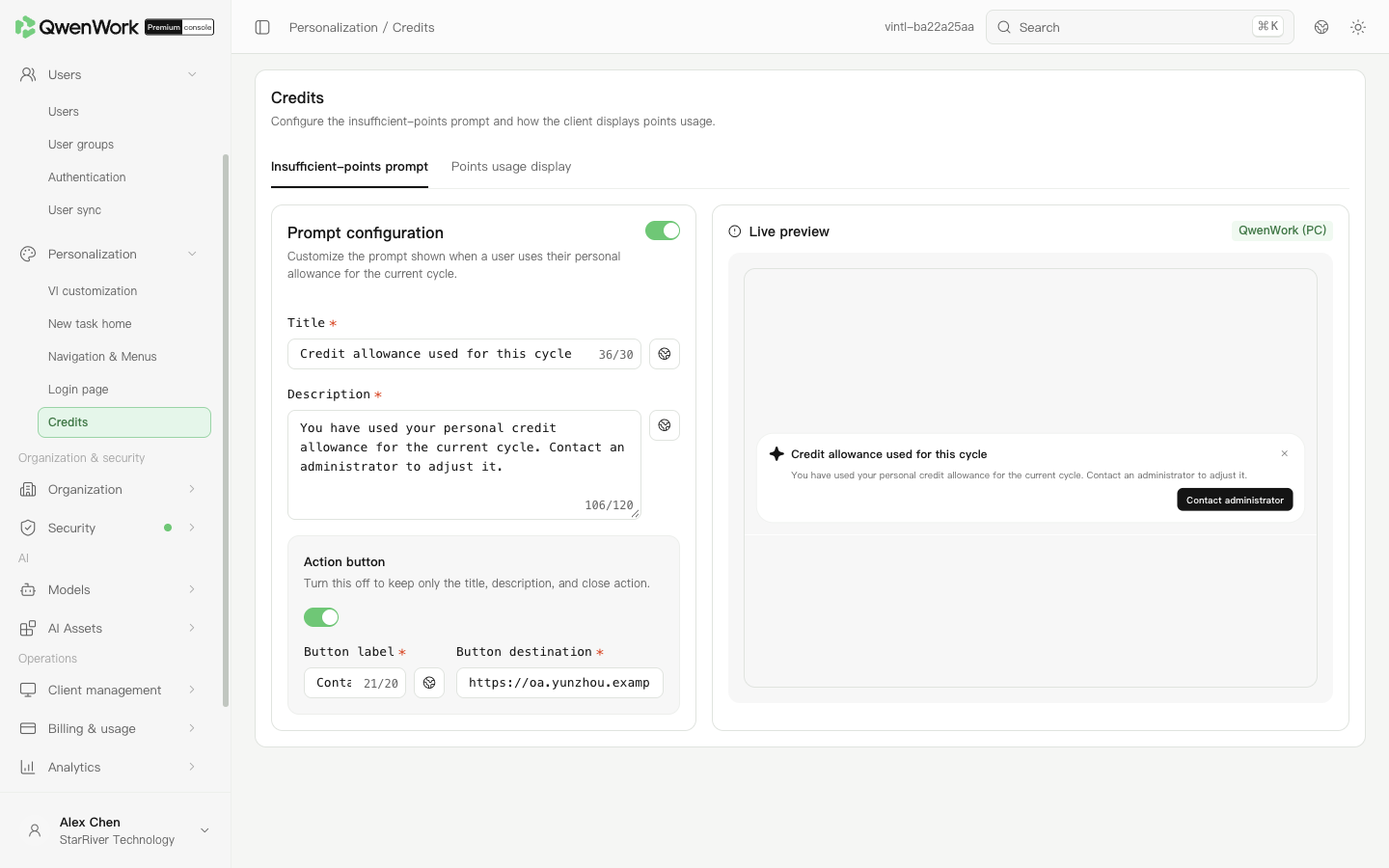 Admin console: the message and action button shown when a member's personal allowance is exhausted.
When the action button is off, the message retains the title, description, and close action. To adjust allowances, open Billing & usage → Limits.
Return to: Personalization overview
Admin console: the message and action button shown when a member's personal allowance is exhausted.
When the action button is off, the message retains the title, description, and close action. To adjust allowances, open Billing & usage → Limits.
Return to: Personalization overview
Set the insufficient credits message
- Open Personalization → Credits → Insufficient-points prompt.
- Enter a title of up to 30 characters, such as “Credit allowance used up”.
- Enter a description of up to 120 characters. Explain the next action, such as contacting the enterprise administrator to adjust the allowance.
- To provide a link, enable the action button and enter its label and destination. The label supports up to 20 characters. Use an address members can actually access.
- Check the title, description, and button in the live preview, then click Save and publish when it appears.