
Feishu SSO lets enterprise users sign in to QwenWork Premium with their Feishu identity.
Feishu SSO lets enterprise users sign in to QwenWork Premium with their Feishu identity. Enter the app credentials in QwenWork, copy its callback, then configure the redirect, permissions, user availability, and publication in the same Feishu custom enterprise app.
You need administrator access to both platforms.
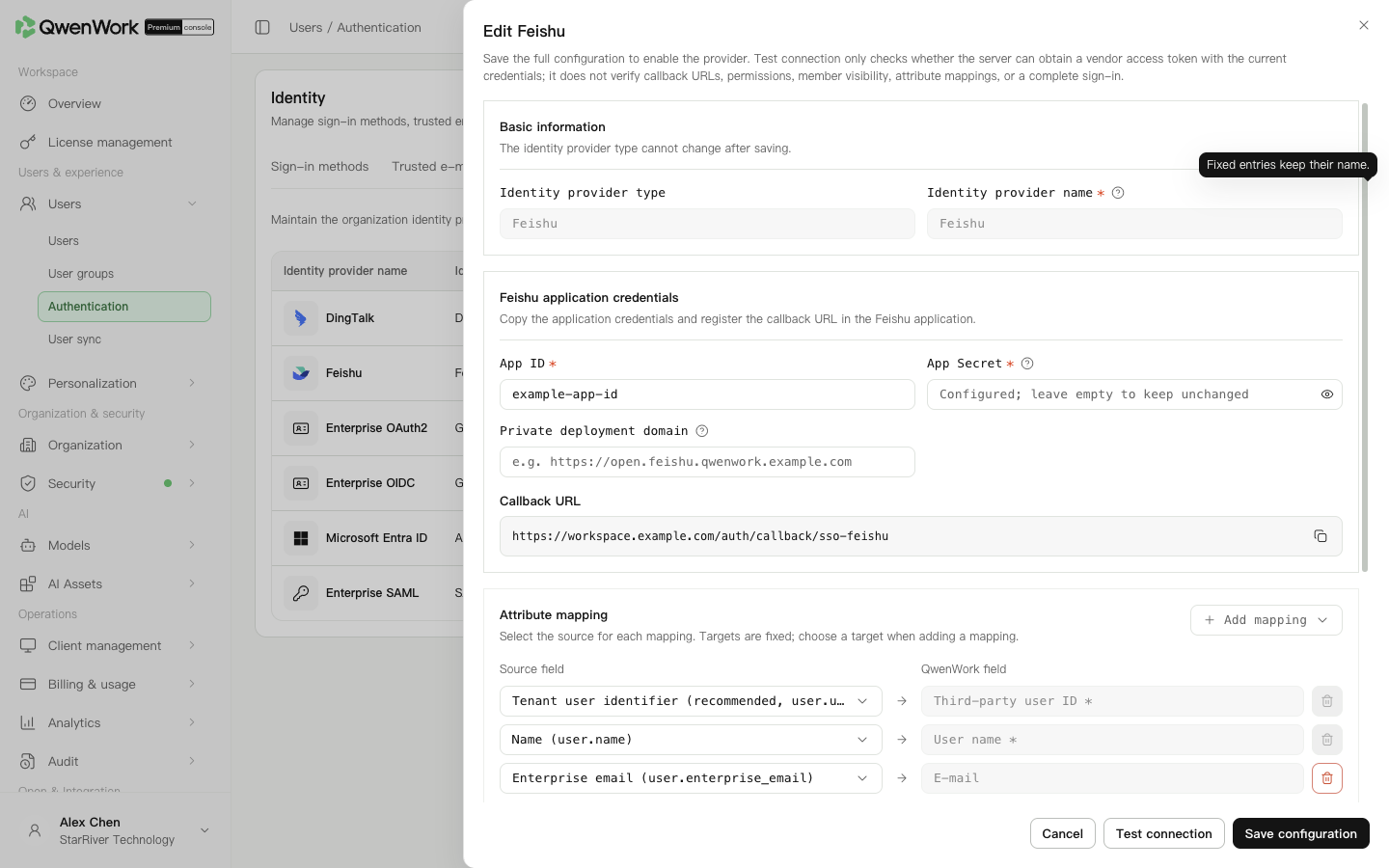 Admin console: Feishu credentials, callback, and user mappings.
Keep external user ID and name. Map at least one of email, phone, employee number, or account, with at least one non-empty returned value for automatic creation. Sources can be selected from the supported fields; targets are fixed.
Make SSO
Keep it off for users already created by sync or import. To create users on first sign-in, enable it and select the default department. Automatic seat assignment requires automatic creation.
SSO matches current users by external user ID only. A conflict-free match preserves the existing profile and sync source. Account, email, phone, or employee-number conflicts with another user reject sign-in. An unmatched ID follows the automatic-creation setting.
Deleted history does not restore the old QID. With automatic creation off, sign-in fails; with it on and conflict-free returned data, a new user and QID use the current profile, default department, and seat policy. Previous roles, passwords, seats, and departments are not inherited. History remains.
Return to: Users / Authentication / Authentication overview.
Prepare the app
You need administrator access to both platforms.
| Item | Purpose |
|---|---|
| App ID and App Secret | Identify the app and call Feishu; obtain them from Credentials and basic information |
contact:user.employee_id:readonly | Read the default user_id identity |
contact:user.email:readonly | Read email when required by the mapping |
contact:user.phone:readonly | Read phone when required |
| Redirect URL | Copy from the QwenWork provider to return sign-in |
Authorize the Feishu app
- Open the Feishu developer console and confirm the enterprise.
- Create or open the dedicated custom enterprise app.
- Obtain the App ID and App Secret securely.
- Enable app sign-in permissions. For the default
user_id, grant access to the user's user ID. Request the email and phone permissions needed by the mappings. - Add the intended users to the app's availability scope.
- Create and publish a version in version management before testing. Recheck publication requirements after permission or availability changes.
Configure QwenWork
- Open Users → Authentication → SSO login and configure or edit Feishu.
- Enter the same app's App ID and App Secret. A blank secret on edit preserves the saved value.
- Leave the private deployment domain blank for ordinary Feishu. Enter the actual private-environment address where applicable.
- Copy the callback URL.
Register the redirect
- In the same Feishu app, open Development configuration → Security settings.
- Paste the complete copied callback into Redirect URL, add it, and save.
- Use the callback from the current environment, rather than a QwenWork home-page URL or screenshot example.
- Publish a new app version if permissions or user availability changed.
Check user mappings
| QwenWork field | New-provider default |
|---|---|
| External user ID | user.user_id |
| User name | user.name |
user.enterprise_email |
user.user_id and sync user_id identify the same user. user_id, open_id, and union_id are different identifiers.
Choose automatic creation
Keep it off for users already created by sync or import. To create users on first sign-in, enable it and select the default department. Automatic seat assignment requires automatic creation.
Save, enable, and verify
- Save the complete provider.
- Optionally test App ID and App Secret token retrieval. This does not verify redirects, permissions, user scope, profile fields, or complete sign-in.
- Enable Feishu; only one provider can be active.
- Enable SSO in Sign-in methods separately.
- Ask an ordinary user to sign in and check the enterprise, name, departments, and seat.
Troubleshooting
| Symptom | Check |
|---|---|
| Invalid redirect | Compare the complete copied callback with Feishu's saved security setting |
| App creator succeeds but ordinary users fail | Check availability scope, effective permissions, published version, and enterprise membership |
| User not found | Compare user.user_id with the external ID and check automatic creation |
| Automatic creation fails | Check the default department and mapped, non-empty identity fields |
| Name exists but email is empty | Check email permission, publication, and the user's email profile |
| Account creation fails after authentication | Open Auto-created user records. Check missing identity fields and that the returned email domain matches a trusted domain. At least one of email, phone, or employee number must be present where that is the configured identity set. |