
OpenID Connect (OIDC) adds an identity token to OAuth 2.0.
OpenID Connect (OIDC) adds an identity token to OAuth 2.0. QwenWork checks its issuer, signature, and validity period, then uses its user identifier to associate the account.
Ask the identity administrator for an authorization-code OIDC app, Client ID, Client Secret, discovery address, and signing algorithm. Scopes must include
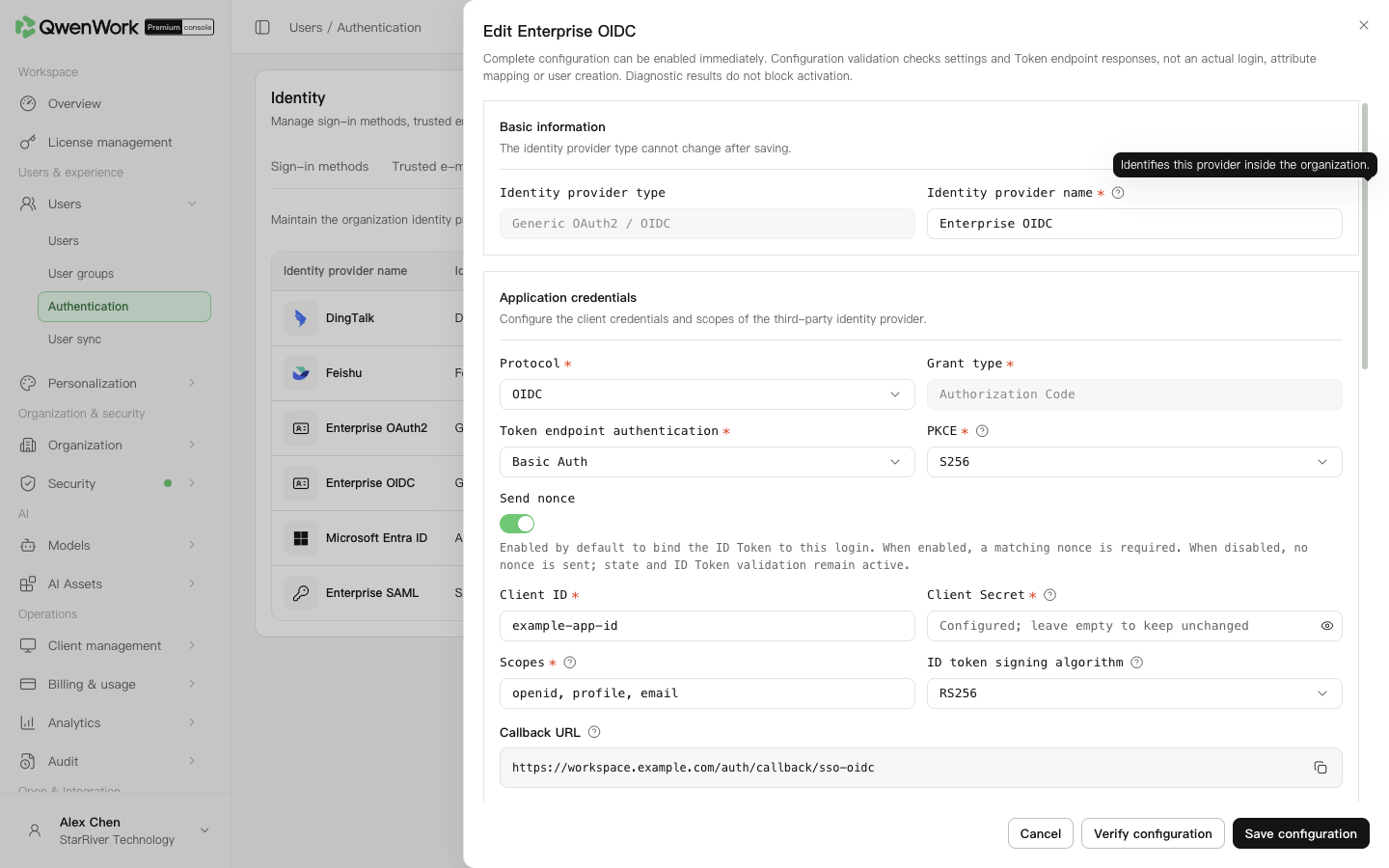 Admin console: OIDC credentials, algorithm, and discovery settings.
The issuer must match the ID token's
SSO matches current users by external user ID only. Conflict-free matches preserve the current profile and sync source. Conflicts with another user's account, email, phone, or employee number reject sign-in. Unmatched IDs follow automatic creation.
An ID found only in deleted history does not restore its old QID. With automatic creation off, sign-in fails. With it on and conflict-free data, a new user and QID use the current returned profile, default department, and seat policy. Old roles, passwords, seats, and departments are not inherited. History remains.
Return to: Users / Authentication / Authentication overview.
Prepare an OIDC app
Ask the identity administrator for an authorization-code OIDC app, Client ID, Client Secret, discovery address, and signing algorithm. Scopes must include openid; add the scopes needed for name, email, and other profiles.
Create the provider
- Open Users → Authentication → SSO login and add a provider.
- Choose Generic OAuth2 / OIDC, enter a name, and retain OIDC as the protocol.
- Enter Client ID, Client Secret, and scopes.
- Match token-endpoint authentication and PKCE to the identity app.
- Choose the actual ID-token algorithm: RS256 verifies with signing public keys; HS256 verifies with the Client Secret.
Obtain and check the endpoints
| Mode | Configuration |
|---|---|
| Well-Known endpoint | Enter the supplied discovery-document URL, parse it, and check the returned endpoints |
| Issuer | Enter the platform's published issuer and parse it |
| Manual | Enter issuer, authorization and token endpoints, the algorithm's public-key endpoint, and UserInfo if needed |
iss, including its path and trailing slash. Obtain actual addresses from the identity administrator.
Check Nonce and clock skew. Nonce links this request to the returned token and must be returned correctly when enabled. Allowed clock skew is 30–300 seconds; keep both systems' clocks synchronized.
Map users and register the callback
- Check sources in the mappings. External user ID usually uses
user.sub; name and email default touser.nameanduser.email. Adjust supported sources if required. - Keep ID and name and at least one of email, phone, employee number, or account.
- If creating users automatically, enable it and choose the default department. At least one usable identity value must be returned.
- Save, reopen the provider, and copy the generated callback. Register it in the identity app and save there.
- Enable the provider and SSO sign-in. Test with an ordinary user and check the account, name, and profile.
Troubleshooting
| Symptom | Check |
|---|---|
| Discovery parsing fails | Reachability from the enterprise service and a valid OIDC discovery response |
| Issuer mismatch | Discovery issuer, saved issuer, and token iss |
| Signature failure | RS256/HS256, public-key URL and key rotation, or Client Secret |
| Nonce or time failure | Returned nonce, token validity, and system clocks |
| Empty name or email | Scopes, actual claims, and mapped sources |