
Customize how QwenWork understands your preferences and working style.
Customize your collaboration style and working manual, and give QwenWork cross-session memory and skill evolution.
Awareness is QwenWork's memory and personalization system — once enabled, it continuously records your preferences and working habits, so every new conversation starts with full context instead of from scratch.
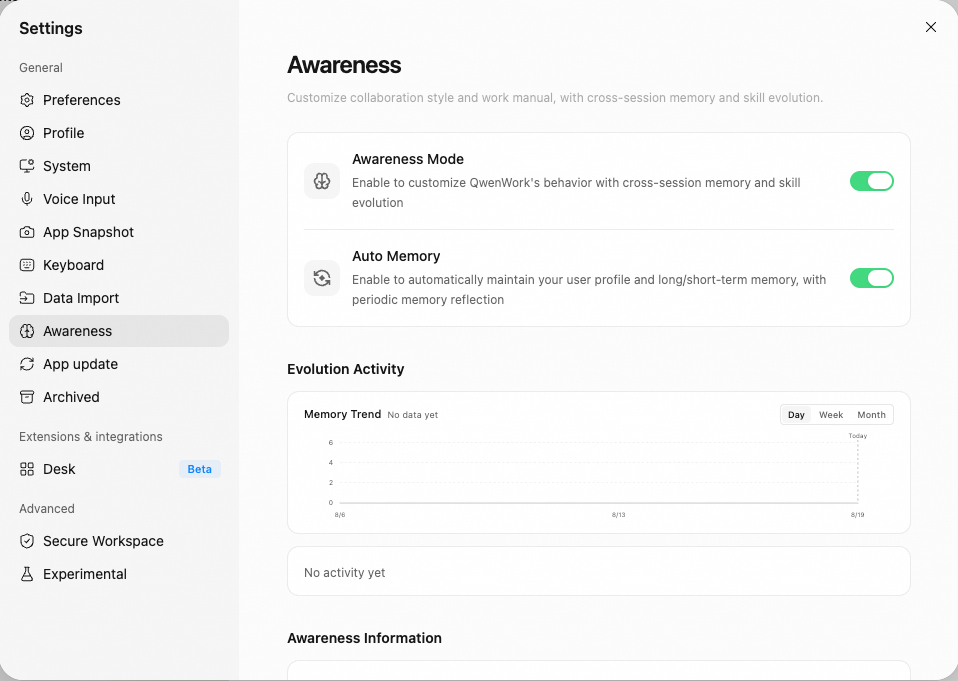
The Awareness page is accessed from the Awareness icon in the left sidebar. It contains two master switches, the Evolution Activity panel, and the entry point for managing all of your Awareness files.
Shows how active the Awareness system has been:
Manage all Awareness-related files and configuration. The following entries are included:
The following actions are irreversible — proceed with caution:
Master Switches
- Awareness Mode — the master switch. When enabled, QwenWork works in your customized style and gains cross-session memory and skill evolution.
- Auto Memory — when enabled, QwenWork automatically maintains your user profile and short- and long-term memory, and triggers memory reflections on a regular basis.
Evolution Activity
Shows how active the Awareness system has been:
- Memory Trend Chart — a line chart showing how memory entries change day by day. You can switch between Day / Week / Month views.
- Today's Stats — the number of reviews, newly added memory entries, skill updates, and reflections for the current day.
- Recent Activity — the latest memory writes and reflection records (short-term memory, memory reflections, etc.) in reverse chronological order. Click "Show More" to view the full history.
Awareness Information
Manage all Awareness-related files and configuration. The following entries are included:
| Entry | Description |
|---|---|
| Storage Location | The root directory of all Awareness files (~/.qwenwork/awareness/main). Click "Open Containing Folder" to open it directly in Finder / File Explorer |
| Collaboration Style | Defines how QwenWork communicates and collaborates. Click "Personalize" to choose a preset style or write your own description (SOUL.md) |
| Working Manual | Defines QwenWork's working standards and behavioral guidelines. You can edit and customize it directly (AGENTS.md) |
| User Profile | Records your basic information, preferences, and habits. Automatically maintained by QwenWork (USER.md) |
| Long-term Memory | Important knowledge and conclusions persisted across sessions. Automatically maintained by QwenWork (MEMORY.md) |
| Short-term Memory | Conversation summaries and temporary notes recorded day by day. Automatically maintained by QwenWork (the memory/ directory) |
| Index | Builds a local search index over your Awareness files so past records can be located quickly. Click "Rebuild Search Index" to refresh it manually |
| Backup & Restore | Export or import the entire Awareness directory (memory files), for multi-device sync or backup |
Danger Zone
The following actions are irreversible — proceed with caution:
- Reset Collaboration Style — clears the current collaboration style configuration. You can choose a new one again via "Personalize".
- Reset Working Manual — restores the working manual (
AGENTS.md) to the initial template. The current content will be overwritten. - Clear Memory — deletes
USER.md,MEMORY.md, and all memory log files. The search index is rebuilt at the same time.